AI agents that answer your WhatsApp chats
Draft replies for your team, or let an agent answer on its own from your knowledge base, and hand the chat to a person when it should.
What the AI does
AI that works inside your shared inbox, under rules you set, and stops when a person should take over.
Suggested replies in the inbox
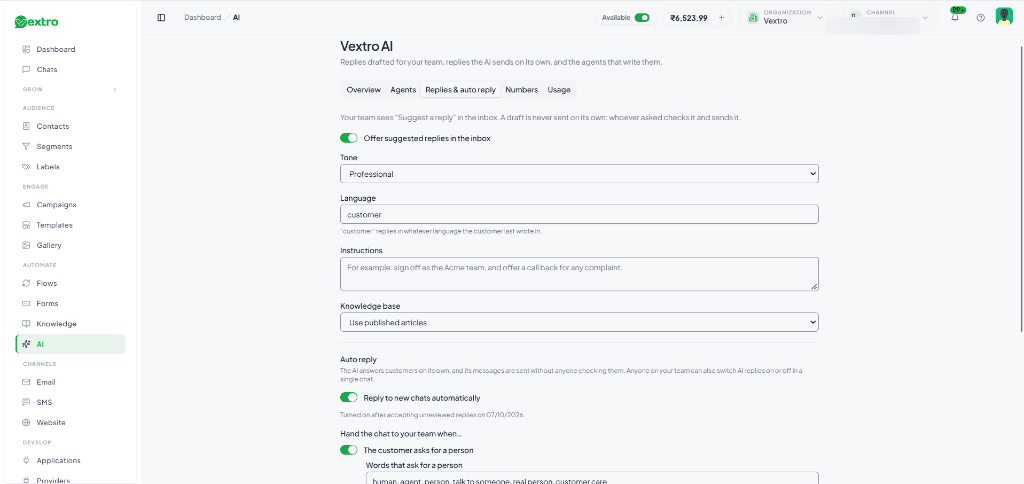
A team member asks for a draft of the next WhatsApp message. The AI writes it from the conversation and your knowledge base; the team member checks it, edits it if needed, and sends it. A suggestion is never sent on its own.
Auto reply, when you choose it
Let the AI answer customers by itself. A business admin turns it on for new chats after accepting that these replies go out unreviewed, or any team member turns it on for a single chat to try it. AI messages are labelled AI in the inbox.
- Only inside WhatsApp's 24-hour reply window
- Never in a chat a team member owns, or while a flow is running
Hands the chat to your team
Each handover rule can be switched on or off. When one applies, AI replies stop for that chat, the chat is queued for your team, and your handover message is sent.
- The customer asks for a person
- The AI is not sure of the answer
- A team member replies or joins the chat
- Too many AI replies in a row
Your own agents
Create agents for different jobs, such as Sales and Support. Give each one its purpose, tone, language, things to always and never do, a sign-off, instructions and the knowledge collections it reads. Choose which agent answers each WhatsApp number, and try an agent on a typed message before it goes live.
Answers from your knowledge base
Write your FAQs, policies, product and pricing details once in Knowledge. The AI reads only published articles, so a draft never reaches a customer. Archive a collection and the AI stops using it.
Answers calls, too
The same agent can pick up your WhatsApp and phone calls. It answers from your knowledge base, hands the call to a person when it should, and can book an appointment while the caller is on the line.
- Answers from published knowledge
- Hands the call to your team
- Books an appointment on the call
Describe a flow, get a draft
In the flow builder, describe the automation you want and the AI drafts it, checked by the same validator as any flow. You decide whether to put it on the canvas; it is never saved or published by itself.
How you set it up
Start with the knowledge your team already answers from, and let the AI take more as you trust it.
Write your knowledge
Add the answers, policies and product details your customers ask about, and publish them.
Set up an agent
Give it a job, a tone, its instructions and the knowledge it may use. Try it on a typed message; nothing is sent while you test.
Choose where it works
Pick which agent answers each WhatsApp number, and set when a chat goes to your team.
Start with suggestions, then auto reply
Have your team use suggested replies first. Turn on auto reply for one chat, then for new chats when you are happy with the answers.
Frequently Asked Questions
Everything you need to know about Vextro and billing.
Put an AI agent on your WhatsApp number
Book a setup call and we will set up your first agent with you, or start a 7-day trial and explore it yourself.